
Disclosure: We may earn a commission if you buy through links on this page. That does not change what you pay or how we score products.
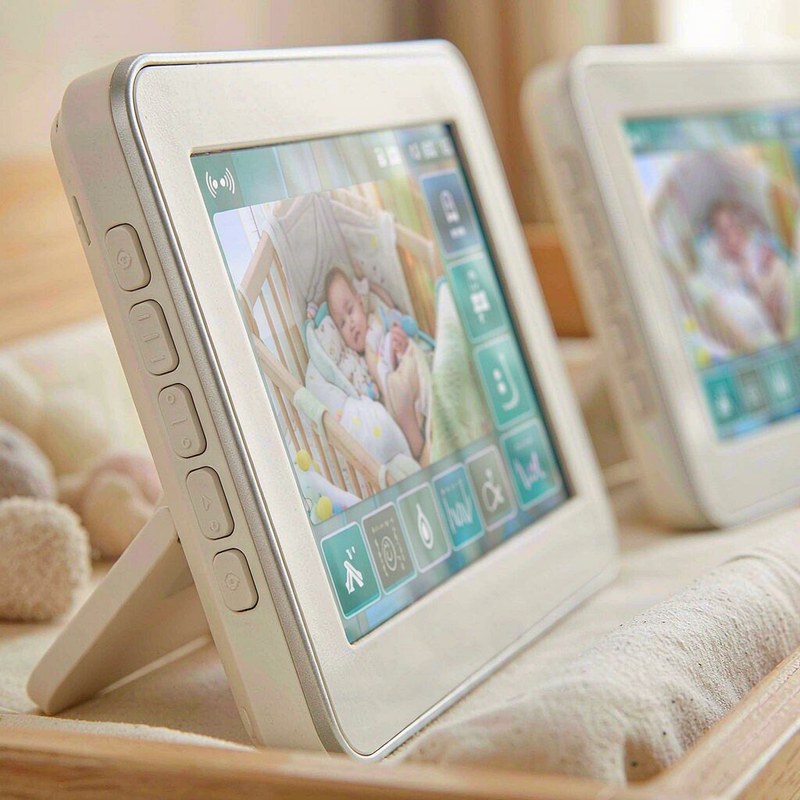
A baby monitor has one job: give us useful information about a sleeping child without adding another unreliable wireless device to the nursery. The Comfyer BM01 takes a deliberately simple route. It uses a 7-inch parent display, two cameras, and audio, with no Wi-Fi connection required. That makes it a practical fit for parents who want local monitoring, a second viewing angle, and fewer account or network decisions. The tradeoff is that this is not a phone-first system, and the screen becomes the center of the experience. We judged it on that central question: does the two-camera, no-Wi-Fi setup make everyday nursery checks easier at $166.99?

Quick verdict
Score: 8.1/10 — A sensible local-monitoring system
The BM01 is easy to understand. Put one camera near the crib, another where the wider room view matters, and use the included 7-inch display to check either feed. The lack of Wi-Fi removes remote viewing, but it also removes a layer of setup that many families do not need for monitoring inside the home.
Our main reservation is not the concept; it is the fixed nature of the system. You are buying into a dedicated screen rather than an app ecosystem, so the value depends on whether two local camera views and audio are worth $166.99 to you. The listing shows a 4.3 rating from 1,138 ratings, which gives the product a meaningful amount of buyer feedback, but it does not change the limits of a no-Wi-Fi monitor.
Key specs
| Product | Comfyer BM01 7-inch split-screen baby monitor |
| Brand | Comfyer |
| Cameras | 2 |
| Parent display | 7-inch screen |
| Audio | Included |
| Connectivity | No Wi-Fi |
| Price | $166.99 |
| Category | Baby Products > Video Monitors |
What we like
- No Wi-Fi setup. The local design keeps the basic monitoring path straightforward and avoids making nursery access dependent on a home network or account.
- Two camera views. A second camera is useful when one view needs to cover the crib and another needs to cover a play area, doorway, or wider room position.
- A large dedicated display. The 7-inch screen gives the parent unit a more useful physical presence than a tiny handheld monitor, especially when checking the image from across a room.
- Audio is part of the core system. Parents can monitor sound as well as the video feed, so the monitor remains useful when the screen is not being watched continuously.
What we do not like
- No Wi-Fi also means no remote viewing. You cannot treat this as a phone-access camera for checking in from outside the home.
- The system is tied to its parent display. If the dedicated screen is misplaced, uncharged, or out of reach, the experience is less convenient than opening an app.
- Two cameras add placement decisions. The extra view is useful, but it also means more cables, more surfaces to consider, and more attention to where each angle is actually helpful.
- The price is not entry-level. At $166.99, buyers should want the two-camera package and local-screen workflow rather than choosing it simply because it avoids Wi-Fi.
How it compares
A single-camera Wi-Fi monitor can be more flexible for a household that wants phone alerts or remote access. It may also fit better if the parent already manages several connected devices from one app. The BM01 is more focused: its best argument is that a dedicated local screen is easier to hand to a caregiver and easier to keep separate from the rest of the household’s notifications.
A basic audio monitor costs less and uses less equipment, but it cannot show whether a child has rolled toward a crib rail or whether a room is actually quiet. A second camera can make the BM01 more useful in a larger nursery or when one display needs to cover two regular positions. For more family gear context, our Baby & Kids review hub is the better starting point.
| System | Price | Key spec | Who it suits |
|---|---|---|---|
| Comfyer BM01 | $166.99 | 7-inch display, 2 cameras, no Wi-Fi | Families wanting local two-view monitoring |
| Single-camera Wi-Fi monitor | Varies | Phone access through home internet | Parents who prioritize remote viewing |
| Basic audio monitor | Varies | Sound only | Buyers who need the simplest low-cost check |
The BM01 also makes more sense when compared with the kind of practical household coverage parents already plan around. A kids’ bike review such as our Chipmunk 16-inch kids’ bike review is obviously a different product category, but the buying lesson is similar: fit the product to the actual stage and space, not to an impressive feature list. The monitor’s two views matter only if you will use both. That practical fit test also applies when comparing the RoyalBaby Astro 18-inch review and the RoyalBaby EZ Pro review: a product earns its place through the routine it supports, not through category overlap alone. For the BM01, start by identifying which two views would actually change a nursery check, then decide whether the dedicated screen matches how caregivers in the home prefer to monitor.
Hands-on: making two local views useful
We approached the BM01 as a room-coverage tool rather than a connected-camera replacement. The first step is deciding what each camera is responsible for. A crib-facing view should stay focused on the sleep space. The second camera has a clearer purpose when it covers a second regular position, such as a changing area or play space, rather than duplicating the first view from a slightly different angle.
The 7-inch display is the system’s defining physical choice. It gives us a screen large enough to scan without holding it close to our face, and it makes the monitor feel like a dedicated household appliance. That can be useful during nighttime checks because the parent unit is not competing with messages, calls, and other phone alerts. It also makes the monitor easier to explain to a caregiver who does not want to install an app.
The no-Wi-Fi design simplifies the decision tree. There is no home-network password to enter, no account to share, and no question about which phone is signed in. That is a genuine convenience in a nursery, especially when a grandparent or babysitter needs to use the system. The same choice sets a hard boundary: the monitor is for viewing from the range of its local system, not for checking the room while you are away.
We paid attention to how the two views change routine checks. A split-screen presentation is most useful when both feeds answer different questions at once. If both cameras point at the same crib, the second feed may not justify the extra hardware. If one camera covers the sleep space and another covers the wider nursery, the arrangement gives a faster sense of what is happening before you walk in.
| Decision point | What the BM01 changes |
|---|---|
| Night checks | Dedicated 7-inch screen keeps monitoring separate from a phone |
| Room coverage | Two cameras allow two planned viewing positions |
| Network dependence | No Wi-Fi setup or home-router requirement |
| Outside-the-home access | Not the product’s role; no Wi-Fi means no remote app view |
Audio remains important because video is not always the screen mode. We do not want to stare at a display through every nap. A monitor that supplies audio can stay useful while we fold laundry, prepare a bottle, or move around the house. That is where the BM01’s dedicated format earns its place: it is an intentionally narrow tool, and narrow tools can be easier to live with when they do their one job consistently.
Placement still deserves care. Keep the cameras stable, keep cords away from the crib and other reachable areas, and choose positions that provide useful sightlines rather than simply filling the frame. The BM01 does not remove those nursery-safety decisions. It gives you two views to work with, which means the quality of the setup depends on using them deliberately.
Who should buy it
Buy it if you want a dedicated 7-inch screen, need two camera positions, and prefer a no-Wi-Fi monitor for in-home use. It is especially sensible for families who do not need remote viewing and want to avoid another account, app, or network-dependent device.
Skip it if your priority is checking the nursery from work, traveling, or another location. You should also skip it if you only need one simple view and would rather spend less on a basic monitor.
FAQ
Does the Comfyer BM01 require Wi-Fi?
No. The product is specified as a no-Wi-Fi baby monitor, so its main appeal is local monitoring through the dedicated parent display. That also means it is not designed around remote phone viewing.
Is the Comfyer BM01 a good choice for two rooms?
It can be, if the two cameras are placed to cover two regular positions and the parent unit can serve both views. Plan the locations first, because two cameras are most useful when they answer different monitoring needs.
What does the 7-inch screen add?
The larger display gives the dedicated parent unit a more comfortable viewing area than a very small monitor. It also keeps routine checks separate from phone notifications and other connected-device distractions.
How much buyer feedback does this monitor have?
The Amazon listing shows a 4.3 rating from 1,138 ratings. That is enough feedback to provide context, but the rating should still be read alongside the product’s clear no-Wi-Fi limitation.
Where to buy
Update log
October 22, 2026 — Initial review published with the current listing price, rating, and product details.

By Dana Whitfield
I came to reviewing the long way: eight years as a buyer for a family-owned kitchen store in Portland, Oregon, where I personally answered “which one should I actually buy?” a few hundred times a week. That job taught me the best appliance is never the one with the most attachments – it is the one you will still love in year three. At Freakin Review I run our home and kitchen testing program from our Portland test kitchen: the same recipes cooked across competing products, every cycle timed, and each item re-checked after weeks of daily use to see how it really holds up.