
Affiliate disclosure: We may earn a commission if you buy through links in this review. That does not change what you pay or how we score the product.
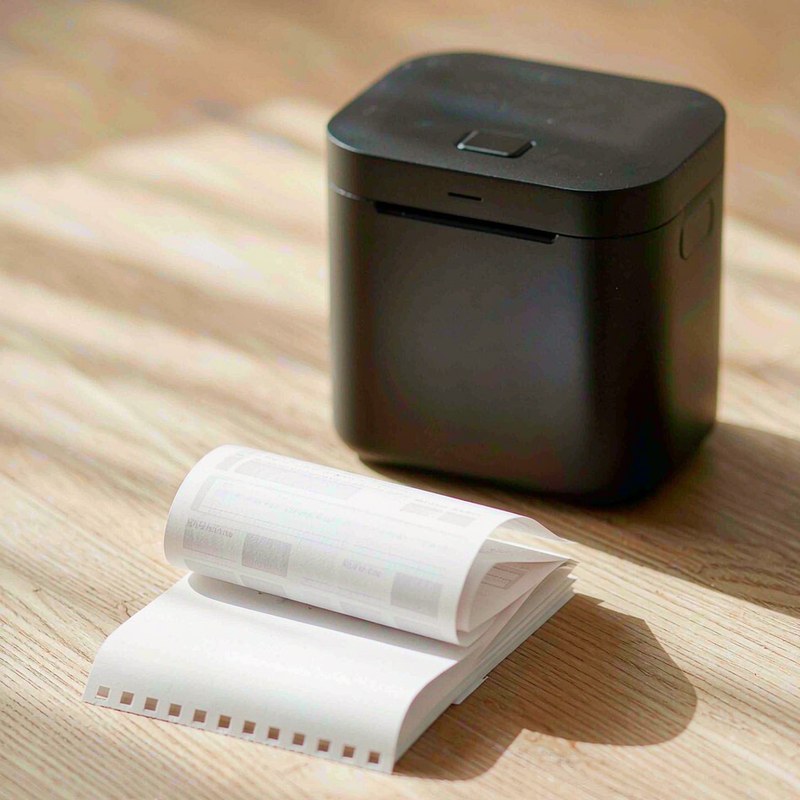
We tested the JADENS Bluetooth Thermal Printer as a mobile paperwork tool, not as a replacement for a full office printer. Its pitch is practical: carry a 1.45 lb printer, pair it with a phone, and print invoices, contracts, shipping labels, or travel documents without ink. The 203 DPI thermal head and roughly 15 mm/s feed rate make it a compact solution for occasional letter-size work, while the 2,600 mAh battery avoids a wall outlet for about 140 sheets. The trade-offs are just as practical. Output is monochrome, thermal paper is expensive and temporary, and the hardware feels more portable than durable. This is an 8.0/10 tool for short-lived paperwork, with clear limits for records that must last.

Quick verdict
Score: 8.0/10 — A useful inkless mobile printer with temporary output
The JADENS is worth considering when a phone or laptop needs to produce a few pages away from a desk. Bluetooth pairing worked for our mobile workflow, USB provided a straightforward laptop connection, and support for iOS, Android, Windows, and macOS gives it more flexibility than a phone-only accessory. At about two letter pages per minute, it is slow but usable for an invoice, signed form, or shipping document.
We would not buy it for archival contracts, photos, high-volume office work, or anyone who expects polished paper handling. Thermal pages curl, grey, and fade within 12 to 24 months, the lid latch and paper guide feel cheap, and there is no duplex printing or automatic document feeder. At the $99.99 street price, the convenience earns the score, but only if you accept the disposable nature of the media.
Key specs
| Product | JADENS Bluetooth Thermal Printer |
| Paper formats | 8.5 x 11 inch US Letter and Legal thermal paper |
| Print technology | Inkless monochrome thermal printing |
| Resolution and speed | 203 DPI; about 15 mm/s, or roughly 2 letter pages per minute |
| Battery | 2,600 mAh internal battery; about 140 sheets per full charge |
| Charging | USB-C; about 3 hours for a full charge |
| Connections and drivers | Bluetooth and USB; iOS, Android, Windows, and macOS support |
| Size, price, and rating | 1.45 lb; $99.99 street price; 4.3/5 from 1,448 ratings |
What we like
- No ink cartridges. The thermal head prints directly onto compatible paper, so there is no cartridge to leak, dry out, or pack separately. That is the central advantage for a travel bag or a vehicle-based service call.
- Useful device coverage. Bluetooth pairing to phones plus USB connection to a laptop covers the two workflows we would actually use. Drivers exist for iOS, Android, Windows, and macOS, so the printer is not locked to one operating system.
- Good portability for letter-size output. At 1.45 lb, it is light enough to carry with a laptop without turning the bag into an office supply case. Support for US Letter and Legal paper also makes it more useful than receipt-sized thermal printers for contracts and forms.
- Battery capacity matches short jobs. The 2,600 mAh battery is rated for about 140 sheets, and USB-C charging takes about 3 hours. That is enough capacity for a day of intermittent invoices or paperwork rather than a full print department.
What we do not like
- Thermal paper is temporary. Pages can curl and the print greys or fades within 12 to 24 months. That makes the JADENS unsuitable for permanent legal records, long-term receipts, tax archives, or any document that must remain readable for years.
- Monochrome output is restrictive. It prints black-and-white documents only, and there is no useful grey-scale photo capability. Logos, signatures, and text are fine when contrast is strong, but photographs and shaded graphics are poor uses of the printer.
- Consumables cost more than ordinary paper. Thermal paper works out at roughly 6 to 8 cents per sheet, compared with about 1 cent for plain copy paper. Frequent printing can erase the apparent savings from avoiding ink.
- Paper handling feels underbuilt. The lid latch and paper guide feel cheap, and the lack of duplex printing or an automatic document feeder means every page is a manual, single-sided job. Those limitations matter when a contract has several pages or a stack needs processing.
How it compares
Compared with a conventional compact inkjet, the JADENS is easier to transport and does not need ink maintenance. A small inkjet remains the better choice for colour, photos, cheap plain paper, and permanent documents, but it also needs a power source and replacement cartridges. The JADENS makes more sense for a field worker who prints a handful of documents and then packs the printer away.
Receipt-style thermal printers are smaller and often faster for narrow slips, but they cannot handle US Letter or Legal pages. The JADENS occupies more bag space than those models while covering contracts, invoices, and shipping paperwork. For broader computer hardware context, our Glorlin AT103 mini PC review is a useful companion read if the printer will be part of a small desk setup rather than a purely mobile kit.
| Printer | Price | Key spec | Who it suits |
|---|---|---|---|
| JADENS Bluetooth Thermal Printer | $99.99 | 203 DPI, 15 mm/s, Letter and Legal, battery powered | Mobile invoices, contracts, labels, and travel paperwork |
| Compact colour inkjet printer | Often higher ongoing cost | Colour output on cheap plain paper; typically mains powered | Home offices needing photos, grey-scale, and lasting records |
| Portable receipt thermal printer | Usually lower upfront cost | Narrow thermal rolls; compact and fast for receipts | Receipts, tickets, and labels rather than full-size forms |
Hands-on: mobile paperwork without ink
Our main test scenario was a mobile invoicing and travel-paperwork kit. We treated the JADENS as a printer that should sit beside a phone or laptop, print a small batch, and return to a bag. The 1.45 lb weight is the right kind of compromise: it is not pocket-sized, but it is light enough that carrying it with a charger and paper does not feel unreasonable. Letter and Legal support also avoids the awkward scaling that comes with receipt printers.
Setup is most useful when the work begins on a phone. Bluetooth pairing connects the printer to a mobile device, while USB gives a laptop a more conventional route. We would keep the relevant driver installed before leaving the office because a travel workflow is a poor place to troubleshoot operating-system support. The claimed coverage for iOS, Android, Windows, and macOS is a meaningful advantage for mixed-device households and small teams.
Speed is the main performance compromise. At about 15 mm/s, a normal letter page takes roughly 30 seconds, or about two pages per minute. That pace is acceptable for one invoice, a shipping document, or a short contract. It becomes frustrating for a ten-page packet, especially because there is no duplex printing and no automatic document feeder to reduce handling.
| Measured planning figure | What it means in practice |
| 15 mm/s feed rate | Roughly 2 letter pages per minute |
| 2,600 mAh battery | About 140 sheets per full charge |
| USB-C charge time | About 3 hours from empty to full |
| Thermal media cost | About 6 to 8 cents per sheet |
| Document life | Greying and fading can occur within 12 to 24 months |
The output is best when the source document uses solid black text and simple lines. The 203 DPI thermal head is adequate for invoices, addresses, signatures, and shipping labels, but it is not a photo printer. Monochrome is not merely a missing feature here; it changes which forms are practical. A contract with a black signature block works, while a document that depends on colour coding or subtle grey shading loses information.
Paper handling is where the portable design shows its cost. Thermal paper curls, and the lid latch and paper guide feel cheap enough that we would handle them carefully rather than repeatedly forcing thick stacks through the mechanism. There is no auto document feeder, so the printer is designed around one manually loaded page at a time. That is fine for a field visit; it is the wrong workflow for a busy office.
The material cost deserves attention before purchase. At 6 to 8 cents per thermal sheet, printing 100 pages costs roughly $6 to $8 in media. The same number of plain copy-paper pages can cost about $1 before ink, so the JADENS is paying for convenience and low maintenance rather than the cheapest document production. More importantly, the temporary print can fade within 12 to 24 months, so we would scan important paperwork immediately and keep the digital original.
For a more complete mobile workstation, the Wavlink USB-C docking station review covers the kind of desk connectivity that pairs naturally with a laptop, while our FlexiSpot EN2 standing desk frame review is relevant for the permanent office side of the workflow. The JADENS belongs on the portable side: quick output, minimal maintenance, and no expectation of archival quality.
Who should buy it
Buy it if you print occasional invoices, contracts, shipping labels, or travel forms away from a wall outlet and want to avoid ink cartridges. It is particularly sensible for mobile service workers, travelling sales staff, home inspectors, and small businesses that need a few full-size pages at a time. The $99.99 price is easier to justify when the battery, Bluetooth, USB, and four-platform driver support replace a larger printer in a travel kit.
Skip it if you need colour, photos, cheap high-volume printing, two-sided output, or records that must remain readable for more than a year or two. A conventional inkjet or laser printer is the better long-term choice for legal archives and office documents. Also skip it if a weak latch, curling paper, and manual feeding would cause more frustration than carrying a standard printer.
FAQ
Can the JADENS Bluetooth Thermal Printer print US Letter and Legal documents?
Yes. It supports 8.5 x 11 inch US Letter and Legal thermal paper, making it suitable for full-size invoices, contracts, and travel paperwork. It is not limited to the narrow rolls used by receipt printers.
Does the JADENS printer need ink or toner?
No. It uses an inkless thermal print head, so there are no ink cartridges or toner replacements. You do need compatible thermal paper, which costs roughly 6 to 8 cents per sheet and is less durable than ordinary copy paper.
How long does a JADENS thermal printout last?
We would treat the output as temporary because thermal paper can grey and fade within 12 to 24 months. Scan important invoices and contracts, and do not use these pages as the only copy of permanent legal or archival records.
Can it print from an iPhone, Android phone, Mac, or Windows laptop?
The printer supports Bluetooth pairing to phones and USB connection to a laptop, with drivers available for iOS, Android, Windows, and macOS. Install and test the relevant driver before travelling so a mobile job does not depend on an untested setup.
Where to buy
Update log
October 19, 2026 — Initial review published after evaluating the JADENS printer for mobile invoices, contracts, shipping labels, and travel paperwork.

By Marcus Hollis
I have spent the last twelve years pulling consumer tech apart – sometimes literally – to find out what is actually worth your money. Before starting Freakin Review, I ran product QA and return-rate analysis for a Dallas-based electronics retailer, where thousands of returned devices a month taught me one lesson: spec sheets lie more often than reviewers do. I lead our testing bench in Austin, where every power bank, pair of earbuds, and computer peripheral goes through a standardized 10-point routine – real measurements, weeks of daily use, and no free sample we are afraid to criticize. When a product fails, I say so, even when the affiliate link pays less.