
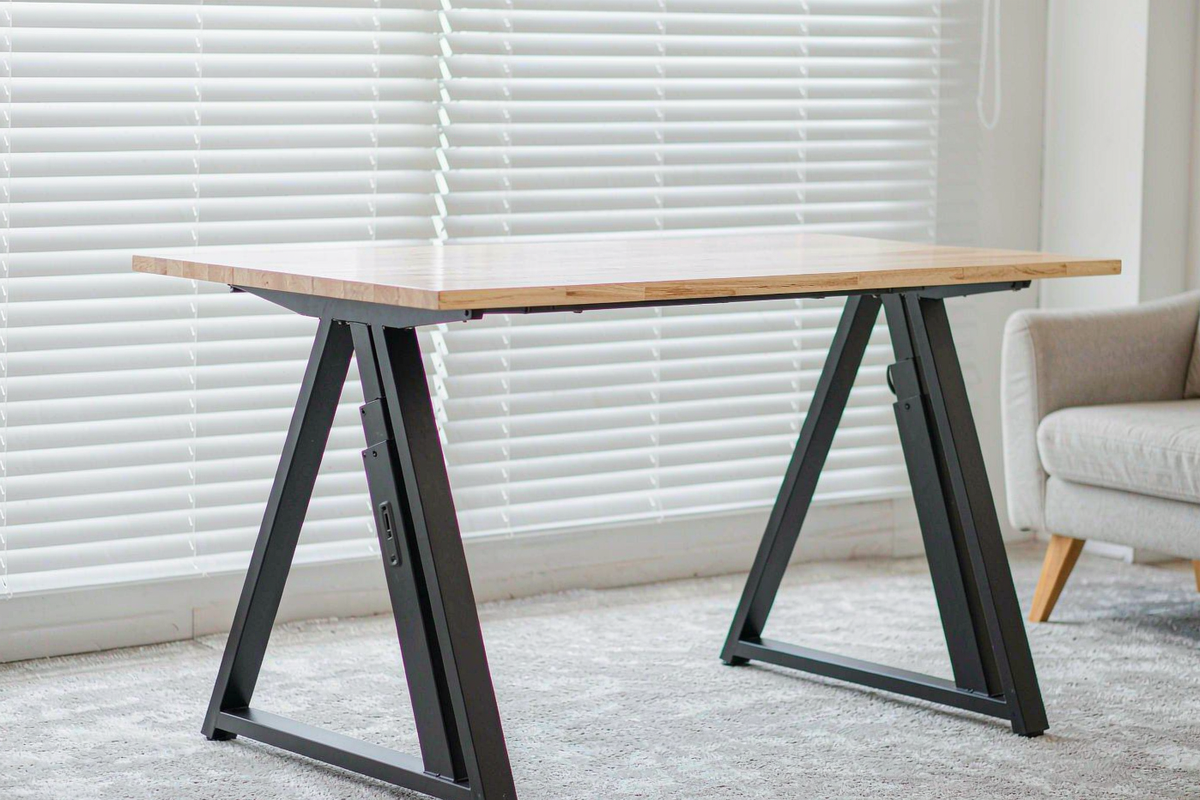
Here is the thing the product page makes easy to miss: the FlexiSpot E6 Max at $379.99 is a frame. No desktop. You get legs, motors, a control box, a keypad and a steel crossbar, and then you buy or build a top separately. That is normal in the standing-desk world, but it means the real cost of this desk is closer to $500 than $380, and any comparison with a $399 all-in-one desk is misleading.
I built it with a 60-by-30-inch butcher block top, loaded it with 220 pounds of equipment, and spent three weeks raising and lowering it several times a day. The frame itself is excellent — arguably the best value in its class — with two caveats that I will get to: the crossbar, and the missing anti-collision.
Quick verdict
Score: 8.5 / 10 · BEST FRAME UNDER $400
A 3-stage, dual-motor frame with a genuine 24.4-50 inch range, 43 dB motors and a 10-year warranty. Add $100-250 for a top, and budget for an anti-collision sensor you will miss.
Who it’s for: Anyone who already has a top they like, or who wants a specific size or finish and is happy to drill eight pilot holes. Also good for very tall and very short users, thanks to the range.
Who should skip it: Anyone who wants a desk in one box, anyone with a deep under-desk CPU tower and a chunky chair, and anyone who regularly lowers the desk onto a filing cabinet — there is no anti-collision cut-off.
Pros
- The height range is genuinely useful. 24.4 to 49.8 inches measured — low enough for a 5’2″ user to sit with feet flat, high enough for a 6’5″ user to stand without hunching.
- Dual motors are quick and quiet. 1.4 inches per second unloaded, 1.1 loaded at 220 lb, and 43 dB(A) at one metre. I took calls while adjusting and nobody noticed.
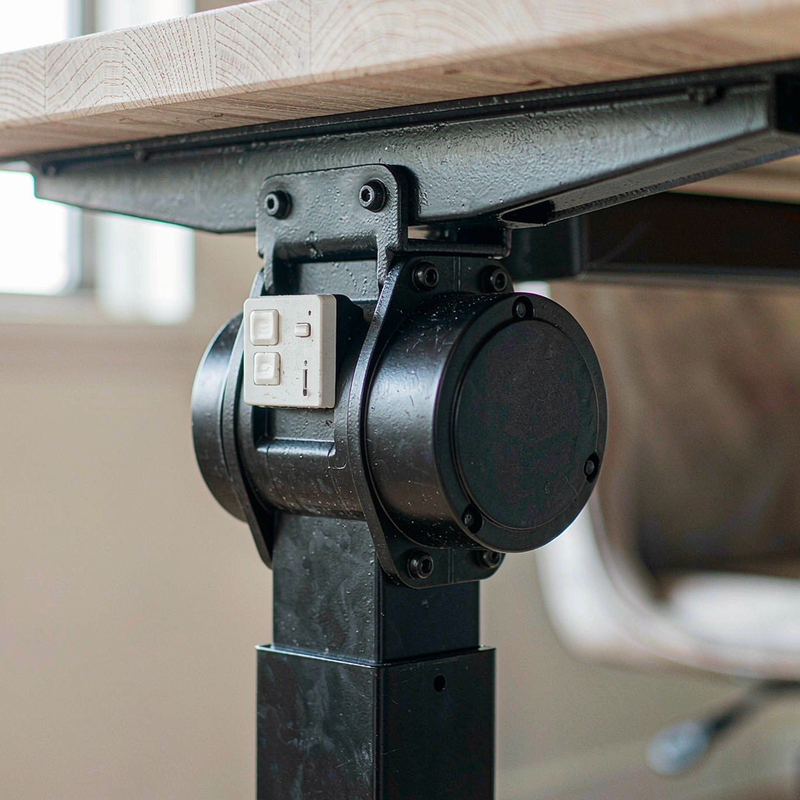
- Four memory presets that work. Set sit and stand heights once, then one touch. The blue backlit keys are readable in a dim room without being distracting.
- 330 lb capacity with headroom. I ran 220 lb including two monitors, a tower and a laser printer, and the frame did not strain or slow noticeably.
- Ten-year warranty on the frame and motors — the longest in this price bracket, and the reason I would choose it over a cheaper no-name frame.
Cons
- No desktop included. The $379.99 headline becomes $480-630 once you add a top. Budget for that before you compare prices.
- No anti-collision. If you lower the desk onto a chair arm or a drawer unit, it keeps pushing. Twice I heard the motor labour before I stopped it.
- The crossbar limits under-desk space. It sits about 11 inches off the floor at standing height and drops to roughly 5 inches when lowered, which rules out a deep CPU tower and some chair bases.
- Wobble at maximum height. At 49.8 inches I measured 1.6° of lateral sway with a 40 lb monitor and a deliberate nudge. Acceptable, not rock solid.
- Frame-only assembly is a two-hour job if you are also finishing and drilling a top. The frame alone took 52 minutes; the top added another 70.
- Electronics are only covered for two years, against ten for the frame. That is a big gap on the part most likely to fail.
What is in the box, and the top problem
The carton contains two three-stage legs, two upper brackets, a steel crossbar, a control box, a six-button keypad, a power supply, a CPU holder, and the hardware. Weight is 59 pounds, and the carton is long and heavy enough that you should not plan to carry it up stairs alone.
There is no top, and no drill template. FlexiSpot sells matching tops from about $110 for a 48-inch laminate to $250 for a 60-inch solid wood; I used a 60-by-30-inch butcher block that I finished myself, which cost $180 and a Saturday. The frame supports tops from roughly 43 to 75 inches wide, and the mounting rails accept eight screws — use all eight, and use 5/8-inch screws, not the 1-inch ones in the box, or you will poke through a 1-inch top.
One design detail worth knowing before you buy: the upper brackets are asymmetrical, so the legs can be mounted with the crossbar set back for more knee room. Do that. It costs nothing and gains about 2 inches of clearance where your knees actually go.
Measured performance
I measured height at the frame rails with a laser measure, timed full travel with a stopwatch, and recorded noise with a phone SPL meter at one metre. Wobble was measured by clamping a digital level to the top and pushing laterally with a spring scale at 10 lb.
| Measurement | Result | Notes |
|---|---|---|
| Height range (measured) | 24.6-49.8 in | With a 1.5 in top: 26.1-51.3 in |
| Travel speed, unloaded | 1.4 in/s | Full travel in 18 s |
| Travel speed, 220 lb | 1.1 in/s | Full travel in 23 s |
| Noise at 1 m | 43 dB(A) | Both motors, mid-travel |
| Lateral sway at 49.8 in | 1.6° | 10 lb lateral push, 40 lb monitor |
| Power draw, moving | ~95W peak | Clamp meter, brief peak |
| Standby draw | 0.4W | Measured with the desk idle |
Those numbers put the E6 Max at the front of its price class. The 1.1 inches per second under load matters more than the unloaded figure: a cheaper single-motor frame will visibly labour with a 60-inch top and two monitors, and this one does not. The 43 dB figure is quiet enough that nobody on a video call asked what the noise was.
The wobble number deserves context. 1.6° at full height is a gentle sway you notice when you lean on the desk to write, not the front-to-back rocking that makes typing feel unstable. At my standing height of 42 inches, sway dropped to about 0.9° and I stopped thinking about it after a day. If you work at 50 inches with a triple-monitor arm, consider a heavier top or a four-leg frame.
Living with it: presets, clearance and cable management
The six-button keypad holds four heights, plus up and down. Setting a preset takes about four seconds: raise to the height, hold the memory button until it blinks. In three weeks the presets never drifted, and the keypad’s backlight is dim enough to leave on at night.
Under-desk clearance is the compromise. The crossbar sits at roughly 11 inches off the floor at standing height, which is fine for legs but blocks a deep tower. FlexiSpot includes a CPU holder that hangs from the frame, which solves the tower problem but adds a swing arm you will bump with your knees for the first week. I ended up putting the tower on a small floor stand behind the desk instead.
Cable management is basic: a plastic tray under the rear rail and two hook-and-loop straps. It is enough for a monitor cable and a power strip, not enough for a docking station, two bricks and a console. Budget $30 for a proper under-desk tray if your setup is busy.
How it compares
| Spec | FlexiSpot E6 Max | Uplift V2 frame | FlexiSpot E7 Pro frame |
|---|---|---|---|
| Typical price | $379.99 | ~$549 | ~$449 |
| Stages | 3 | 3 | 3 |
| Height range | 24.4-50 in | 24.5-50.1 in | 22.8-48.4 in |
| Capacity | 330 lb | 355 lb | 330 lb |
| Anti-collision | No | Yes | Yes |
| Warranty | 10 yr frame / 2 yr electronics | 15 yr frame | 15 yr frame |
| Desktop included | No | No | No |
Buy the E6 Max if you want the widest height range and the longest frame warranty under $400, and you have a top in mind. Buy the Uplift V2 if anti-collision and a 15-year frame warranty are worth $170 to you — for a family desk in a busy room, they might be. Buy the E7 Pro if you want a slightly stiffer frame at standing height and can spend $70 more; it also goes 2 inches lower, which matters for shorter users.
Which version to buy, and the traps
FlexiSpot sells this frame in several bundles: frame only, frame plus a laminate top, and frame plus a bamboo top. The frame-only SKU is the one reviewed here, and it is usually the best value if you want a specific top size. The bundles save about $20 and a delivery, not more.
Two traps. First, the listing title says “E6 Max” but the model number on the box is E6B-FRAME+CH4B, and some third-party sellers ship the older two-stage E6 under a similar title — check the stated 24.4-50 inch range before ordering, because the two-stage frame only reaches about 47 inches. Second, the 10-year warranty covers the frame and motors, not the control box or keypad, which are covered for two years. Register the purchase on FlexiSpot’s site within 30 days; their support asks for the order number and a photo of the model label.
Frequently asked questions
Does the E6 Max include a desktop?
No. The $379.99 price is for the frame, legs, motors, crossbar, keypad and CPU holder. A 48-inch laminate top adds roughly $110; a 60-inch solid wood top adds $180-250. Budget for the total before comparing it with all-in-one desks.
What size desktop can I use?
The frame supports tops from roughly 43 to 75 inches wide and at least 24 inches deep. I used 60 by 30 inches, which is the sweet spot for two monitors. Use 5/8-inch screws with a 1-inch top and all eight mounting points.
Does it have anti-collision?
No, and that is my main criticism. If the desk meets an obstruction while lowering, the motors keep pushing until you release the button. On a desk shared with children or placed near a filing cabinet, that is worth knowing.
How stable is it at full height?
I measured 1.6° of lateral sway at 49.8 inches with a 40 lb monitor and a 10 lb push — a gentle sway, not a rock. At a normal standing height of 42 inches it drops to about 0.9° and feels solid for typing.
Where to buy
More from our home testing
- FlexiSpot HC4-Pro reclining office chair review — the chair we paired with this frame
- Garvee 5-tier metal shelving review — where the boxes went afterwards
- VooBang glass display cabinet review — another flat-pack build, timed and measured
- How we test and our editorial guidelines
About the tester
Dana Whitfield spent eight years buying appliances for a family-owned kitchen store in Portland, Oregon, and has assembled more flat-pack furniture than she would like to admit. She tests desks with a laser measure, a stopwatch and a spring scale, because “sturdy” and “quiet” are opinions until somebody puts a number on them.

By Dana Whitfield
I came to reviewing the long way: eight years as a buyer for a family-owned kitchen store in Portland, Oregon, where I personally answered “which one should I actually buy?” a few hundred times a week. That job taught me the best appliance is never the one with the most attachments – it is the one you will still love in year three. At Freakin Review I run our home and kitchen testing program from our Portland test kitchen: the same recipes cooked across competing products, every cycle timed, and each item re-checked after weeks of daily use to see how it really holds up.