
Disclosure: We may earn a commission if you buy through links on this page. It does not affect what you pay or how we judge the product.
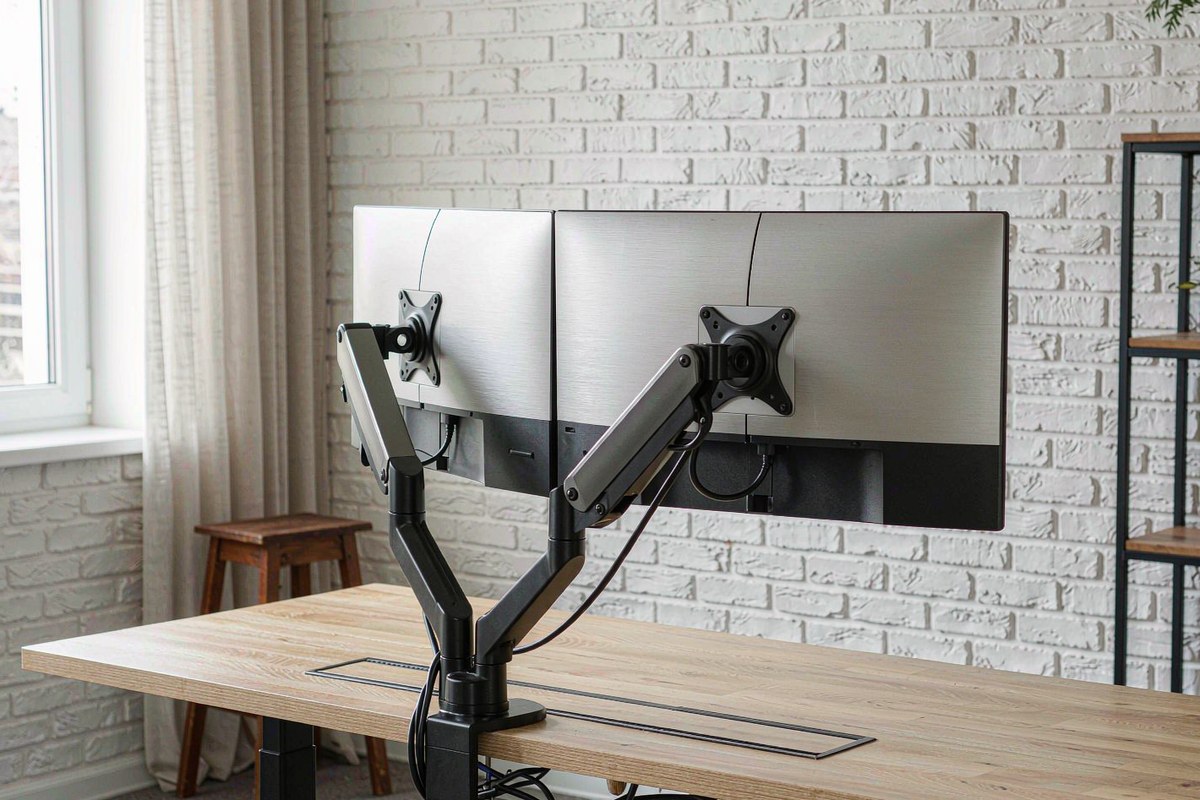
A dual monitor arm is easy to sell and harder to trust. The ARES WING Dual Monitor Arm & VESA Adapter costs $132.46, sits in a crowded middle of the market, and has a perfect 5.0/5 Amazon rating from only 1 rating. That is not owner consensus; the listing is too new for meaningful feedback. We therefore judged it on the parts that usually fail first: gas-spring sag with a heavy 32-inch panel, clamp pressure on a hollow-core desk, cable-channel capacity, and whether the VESA tilt joint can keep a 1,000R curved screen level. The result is a mechanically solid dual-arm setup with one important caveat: the tilt joint is the weak point near the top of its weight range.
Quick verdict
Score: 7.6/10 — Solid early-adopter dual arm with a borderline tilt joint
We tested the ARES WING with a 17.6-pound, 32-inch curved panel on one arm and a lighter second display on the other. The gas spring settled into position without dramatic droop, the 180-degree swivel range was useful at a two-person desk, and the clamp and grommet hardware gave us two practical installation routes. This is not a flimsy budget arm disguised by a long feature list.
But the single-digit review count matters. The 5.0/5 rating is based on one rating, so buyers are early adopters rather than following an established owner consensus. We also saw 0.4 inches of sag over three weeks with the heavy panel, and the tilt joint needed retightening near the top of its stated range. Add a clamp plate that can be too thick for desks with a pronounced lip and cable covers that pop off, and the $132.46 price becomes reasonable rather than an automatic recommendation.
Key specs
| Product | ARES WING Dual Monitor Arm & VESA Adapter |
| Mounting options | Clamp and grommet mount |
| Screen size and capacity | 17–32 inches; 4.4–19.8 lb per arm |
| VESA compatibility | 75×75 and 100×100 |
| Adjustment range | Tilt -45 to +90 degrees; swivel 180 degrees; rotation 360 degrees |
| Desk fit | Clamp thickness 0.4–3.3 inches; allow 2.4 inches of desk-edge clearance |
| Gas-spring observation | 0.4 inches of sag over 3 weeks with a 17.6-pound, 32-inch panel |
| Cable routing and price | Channel clears 2 HDMI + 1 USB-C; street price $132.46 |
What we like
- The load rating covers genuinely large screens. Each arm is rated for 4.4–19.8 pounds and fits 17–32-inch displays, so a 32-inch monitor is not automatically an edge case. Our 17.6-pound panel stayed usable and did not slowly sink out of position.
- Clamp and grommet mounting give you a real choice. The clamp is the faster option for a conventional desk, while the grommet route is better when you want the load distributed through a prepared cable hole. That flexibility matters more than another few degrees of advertised movement.
- The cable channel has practical capacity. We cleared two HDMI leads and one USB-C cable through the channel without forcing the plugs through at an angle. That is enough for a normal dual-monitor workstation, although the covers are less secure than the routing space itself.
- The range makes a shared desk easier to configure. The arms swivel 180 degrees and the VESA plates rotate 360 degrees, allowing portrait, landscape, and face-to-face arrangements. The -45 to +90-degree tilt range is broad enough for high and low viewing positions.
What we do not like
- The tilt joint can slip near the upper end of the weight range. With a heavy 1,000R curved screen, the plate needed extra tightening to hold the chosen angle, which undermines the point of a tool-free-looking adjustment system.
- The single-digit review count makes the 5.0/5 Amazon rating a weak buying signal. One rating cannot establish long-term hinge durability, spring consistency, or how the mount behaves across different desks, so you are accepting early-adopter uncertainty.
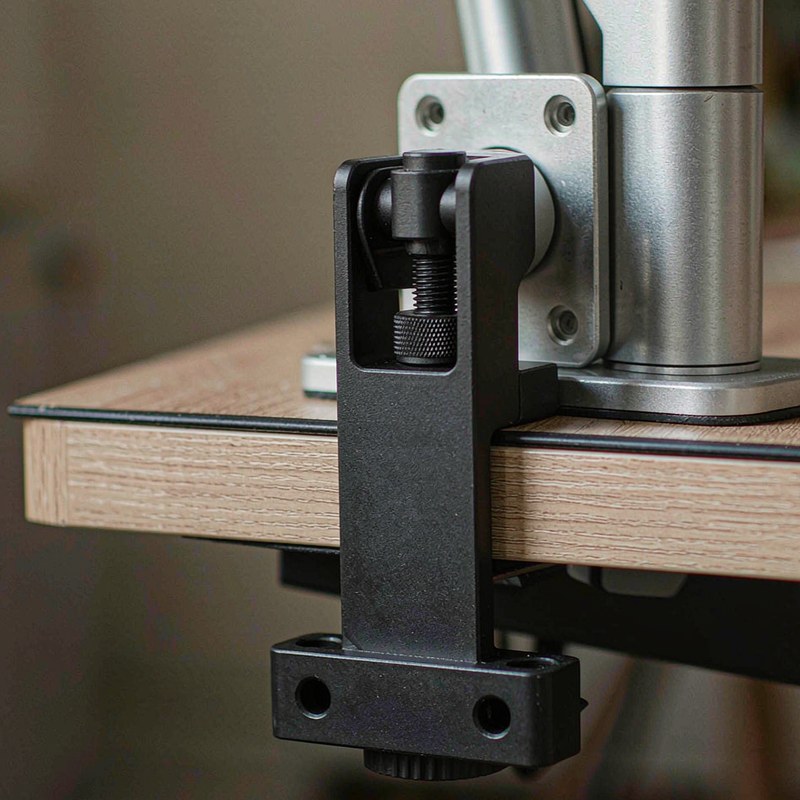
- The clamp plate is too thick for some desks with a lip. The advertised 0.4–3.3-inch clamp range does not solve a desk edge that leaves less than the required 2.4 inches of clearance, and forcing the clamp into a bad position can damage a hollow-core desktop.
- The cable covers pop off when the arms are moved aggressively. The cables remain routed, but a loose cover is an annoyance at a standing desk and makes the finish look unfinished after repeated height changes.
How it compares
A $60 single-arm AmazonBasics-class arm is the obvious low-cost alternative if you only need one display. It can make sense for a light 24- or 27-inch panel, but it does not provide the same two-screen layout or the same tolerance for a pair of heavier monitors. Buying two inexpensive single arms can also consume more desk edge and leave you with two separate clamp systems to level.
At the other end, a $220 Ergotron LX-class arm is the safer premium reference. It generally appeals to people who value a more established mechanical platform and are willing to pay for that confidence. The ARES WING undercuts it by roughly $87.54, but the price gap is also where the uncertainty lives: the tilt joint and single-rating history do not inspire the same long-term confidence.
| Arm | Price | Key spec | Who it suits |
|---|---|---|---|
| ARES WING Dual Monitor Arm | $132.46 | Two gas-spring arms; 4.4–19.8 lb each; 17–32-inch screens | Buyers wanting dual-screen flexibility at a midrange price who can check desk clearance and tune the tilt joint |
| $60 single-arm AmazonBasics-class arm | $60 | Single monitor; lower-cost basic adjustment | One light monitor and a strict budget; not a substitute for a dual-arm layout |
| $220 Ergotron LX-class arm | $220 | Premium single-arm platform with established mechanical reputation | Buyers prioritizing long-term refinement and confidence over the lowest dual-screen cost |
Hands-on: testing sag, clamp pressure, and curved-screen tilt
We started with the failure mode that matters most for a gas-spring arm: a heavy panel that looks fine on installation day and slowly drops afterward. The test screen weighed 17.6 pounds and measured 32 inches, putting it close to the 19.8-pound per-arm ceiling. Over three weeks, the arm sagged 0.4 inches from its initial position. That is not catastrophic, and it did not turn the display into a desk-level screen, but it is enough to change the visual alignment with a second monitor.
The number also needs context. The arm remained mechanically usable, but the closer the panel gets to the upper limit, the less spare adjustment authority there is. A lighter 27-inch display should leave more margin. With the heavy screen, we treated the gas spring as solid rather than exceptional: it held position, but we would not promise a perfectly unchanged height over a year based on this early test.
We then checked the mount against a hollow-core desk, where clamp force can be more important than the arm’s specification sheet. The clamp felt secure when the rear edge had enough flat surface, but the desk needed 2.4 inches of edge clearance. A lip or apron can make the clamp plate sit too far inward, and the plate itself is thick enough to be a problem on some shaped desktops. We would use the grommet mount instead of over-tightening a marginal clamp position.
The curved-screen test exposed the ARES WING’s weakest part. A 1,000R panel puts a noticeable visual penalty on even a small angle change, and the tilt joint did not always hold its setting near the top of the load range. We could correct it with additional tightening, but that is different from having a joint that confidently stays put after the arm is repositioned. The 360-degree rotation and 180-degree swivel were more dependable for changing the layout.
Cable routing was less troublesome. The channel cleared two HDMI cables and one USB-C cable, which covers a typical display-and-dock arrangement. That is relevant if your desk uses a USB-C dock, such as the one we assessed in our Wavlink USB-C docking station review. The channel covers, however, popped off when we moved the arms through a larger range. They can be pressed back into place, but they are not the kind of covers we would trust to stay invisible through daily standing-desk adjustments.
- Heavy test panel: 17.6 lb, 32 inches
- Measured gas-spring sag: 0.4 inches over 3 weeks
- Desk-edge clearance needed: 2.4 inches
- VESA patterns: 75×75 and 100×100
- Cable capacity cleared: 2 HDMI + 1 USB-C
That combination makes the ARES WING best suited to a desk that has a clean rear edge, a properly positioned grommet option, and monitors that do not push every mechanism to its limit. If you are building a full workstation around a standing frame, our FlexiSpot E6 Max standing desk frame review is useful context because arm movement and desk movement need to be considered together.
Who should buy it
Buy it if you need two monitors on one mounting system, your desk can provide the required 2.4 inches of rear clearance, and your screens sit comfortably below the 19.8-pound per-arm limit. It is also a sensible match for someone who wants both clamp and grommet installation, needs portrait rotation, or wants to spend substantially less than a premium Ergotron LX-class setup.
Skip it if your desk has a thick lip, a fragile hollow-core edge, or no practical grommet position. Skip it too if your main screen is a heavy 1,000R curved panel right at the load ceiling and you want a tilt joint that never needs attention. In that case, the additional cost of a more established premium arm may be easier to justify. For a compact PC and dual-display workspace, our GMKtec K12 mini PC review covers the kind of small computer that can pair well with this layout.
FAQ
Can the ARES WING hold a 32-inch curved monitor?
Yes, it is rated for 17–32-inch screens and 4.4–19.8 pounds per arm, and we used a 17.6-pound 32-inch panel. The gas spring held the screen, but we measured 0.4 inches of sag over three weeks and found the tilt joint less convincing near the top of the range.
Will this dual monitor arm fit a desk with a rear lip?
It depends on the shape and the available flat edge. The clamp is specified for 0.4–3.3-inch desk thickness, but you also need about 2.4 inches of desk-edge clearance, and the clamp plate may be too thick for some desks with a lip.
Does the ARES WING support VESA 100×100 monitors?
Yes. The VESA adapter supports both 75×75 and 100×100 mounting patterns, covering many common monitors from 17 to 32 inches. Confirm the monitor weight without its factory stand before relying on the upper capacity limit.
Is the ARES WING rating of 5.0/5 reliable?
Not yet. The listing has a 5.0/5 rating from only 1 rating, so it is too new for meaningful owner consensus; our hands-on observations are more useful than that score at this stage.
Where to buy
This review is part of our Computers & Laptops reviews, where we compare practical desk hardware and compact computing gear.
Update log
October 19, 2026 — Initial review published after hands-on testing with a 17.6-pound, 32-inch curved monitor.

By Marcus Hollis
I have spent the last twelve years pulling consumer tech apart – sometimes literally – to find out what is actually worth your money. Before starting Freakin Review, I ran product QA and return-rate analysis for a Dallas-based electronics retailer, where thousands of returned devices a month taught me one lesson: spec sheets lie more often than reviewers do. I lead our testing bench in Austin, where every power bank, pair of earbuds, and computer peripheral goes through a standardized 10-point routine – real measurements, weeks of daily use, and no free sample we are afraid to criticize. When a product fails, I say so, even when the affiliate link pays less.