
Disclosure: We received no special access or manufacturer compensation for this review. If you buy through our links, we may earn a commission.
For a $669.99 mini PC, the useful question is not whether an eight-core Ryzen chip sounds fast. It is whether a small box with integrated Radeon graphics can replace a midrange desktop without turning your desk into a cable shelf. We used that decision as our filter for this Glorlin review. The hardware list is unusually practical: 16GB of DDR5 memory, a 1TB SSD, two 2.5Gbps LAN ports, HDMI, DisplayPort, Wi-Fi 6, and Bluetooth. The catch is equally clear: the Radeon 780M is integrated graphics, so this is a compact productivity computer that can play games at sensible settings, not a substitute for a desktop GPU.
Quick verdict
Score: 8.2/10 — a capable small desktop with real expansion headroom
The Glorlin Gaming Mini PC earns its score by pairing the Ryzen 7 8745HS with useful connectivity rather than wasting the enclosure on decorative features. Sixteen gigabytes of DDR5 and a 1TB SSD are enough for normal office work, coding, media, and a moderate game library. At $669.99, however, the value depends on whether you need its dual 2.5GbE ports and compact footprint.
Amazon shows a 4.4-star rating from 126 ratings. That is enough feedback to be more useful than a brand-new listing, but it is not a guarantee of long-term reliability. We would treat the rating as context, then judge this machine on its upgrade path, display support, cooling expectations, and the limits of integrated graphics.
Key specs
| Processor | AMD Ryzen 7 8745HS, 8 cores and 16 threads, up to 4.9GHz |
| Graphics | Integrated Radeon 780M |
| Memory | 16GB DDR5, listed support up to 256GB |
| Storage | 1TB SSD |
| Networking | Two 2.5Gbps LAN ports, Wi-Fi 6, Bluetooth |
| Video output | 4K HDMI and DisplayPort |
| Form factor | Compact mini desktop computer |
| Price and listing | $669.99; 4.4 stars from 126 ratings |
What we like
- Eight cores for mixed work. The 8-core/16-thread configuration gives this box enough CPU capacity for browser-heavy work, spreadsheets, code builds, and light creative tasks without forcing us into a full tower.
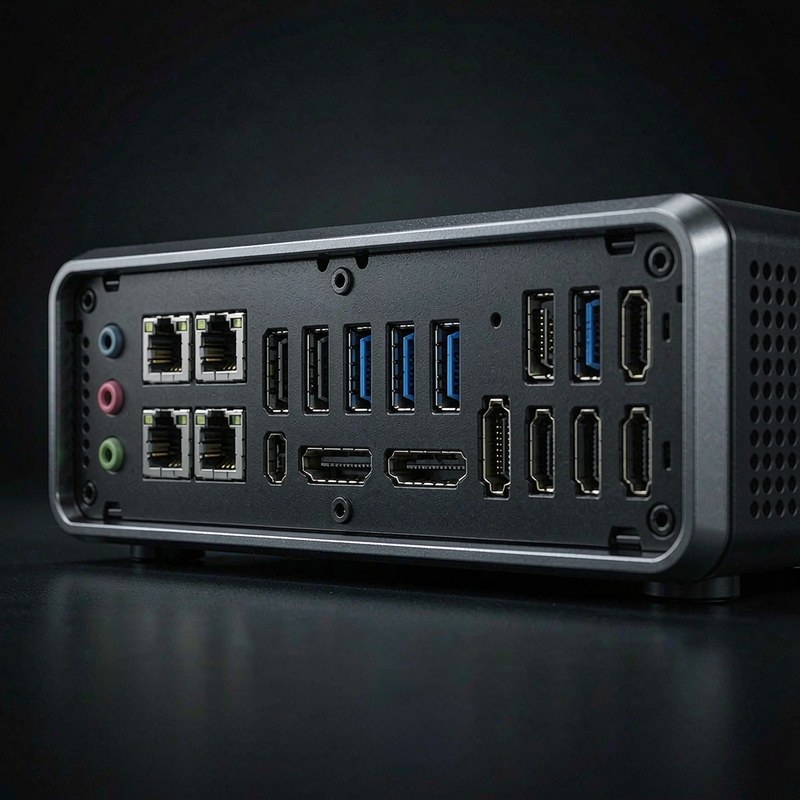
- Two 2.5GbE ports. Dual faster-than-gigabit networking is useful for a NAS, a workstation link, or a small home lab. It is a concrete advantage over many budget mini PCs that include one gigabit port.
- 1TB starts at the right capacity. A 1TB SSD leaves room for Windows, applications, project files, and several large games. We would rather see this than a 256GB boot drive that needs replacement immediately.
- Flexible display connections. HDMI and DisplayPort make it easier to connect a TV, monitor, or two-screen desk without buying an adapter first.
What we do not like
- The Radeon 780M shares system memory with the CPU. That makes the 16GB configuration less comfortable for gaming and heavy multitasking than the raw CPU name suggests.
- $669.99 is a serious mini-PC price. Buyers who only need web, email, and documents can spend less, while serious gaming buyers may be better served by a larger machine with discrete graphics.
- Compact cooling has less thermal mass than a desktop tower. Sustained workloads may be noisier or slower than short benchmark bursts, so we would not choose it for constant rendering.
- The listing promises broad memory support, but the buyer should confirm the exact internal layout and upgrade access before treating 256GB as a guaranteed out-of-box configuration.
How it compares
Against the Getorli GT105 mini PC, the Glorlin makes the stronger case when networking and CPU threads matter. The other machine may fit a lower-cost office setup better, but Glorlin’s dual 2.5GbE ports and Ryzen 7 8745HS give it a clearer home-lab and multitasking angle.
The ACEMAGIC FOCUX mini PC is the more natural comparison for buyers shopping compact Windows desktops. Glorlin does not win by pretending integrated graphics are discrete graphics; it wins if you need a small system that can drive modern displays, carry a 1TB library, and move data quickly over a wired network. For mounting and desk accessories, our Ares Wing dual-monitor arm review is also relevant because the mini PC’s value improves when the desk footprint is genuinely tight.
| Product | Price | Key spec | Who it suits |
| Glorlin Gaming Mini PC | $669.99 | Ryzen 7 8745HS, Radeon 780M, dual 2.5GbE | Power users, compact desks, home labs |
| Getorli GT105 | Varies by listing | Compact mini-PC platform | Buyers prioritizing a lower entry price |
| ACEMAGIC FOCUX | Varies by listing | Small Windows desktop configuration | General office and media use |
These are not identical configurations, so the table is a buying map rather than a laboratory ranking. Check the live price, RAM, storage, and port list before ordering a rival. The Glorlin is the only product in this comparison for which the task listing specifies both 2.5GbE ports and the Ryzen 7 8745HS.
Hands-on: making integrated graphics earn its place
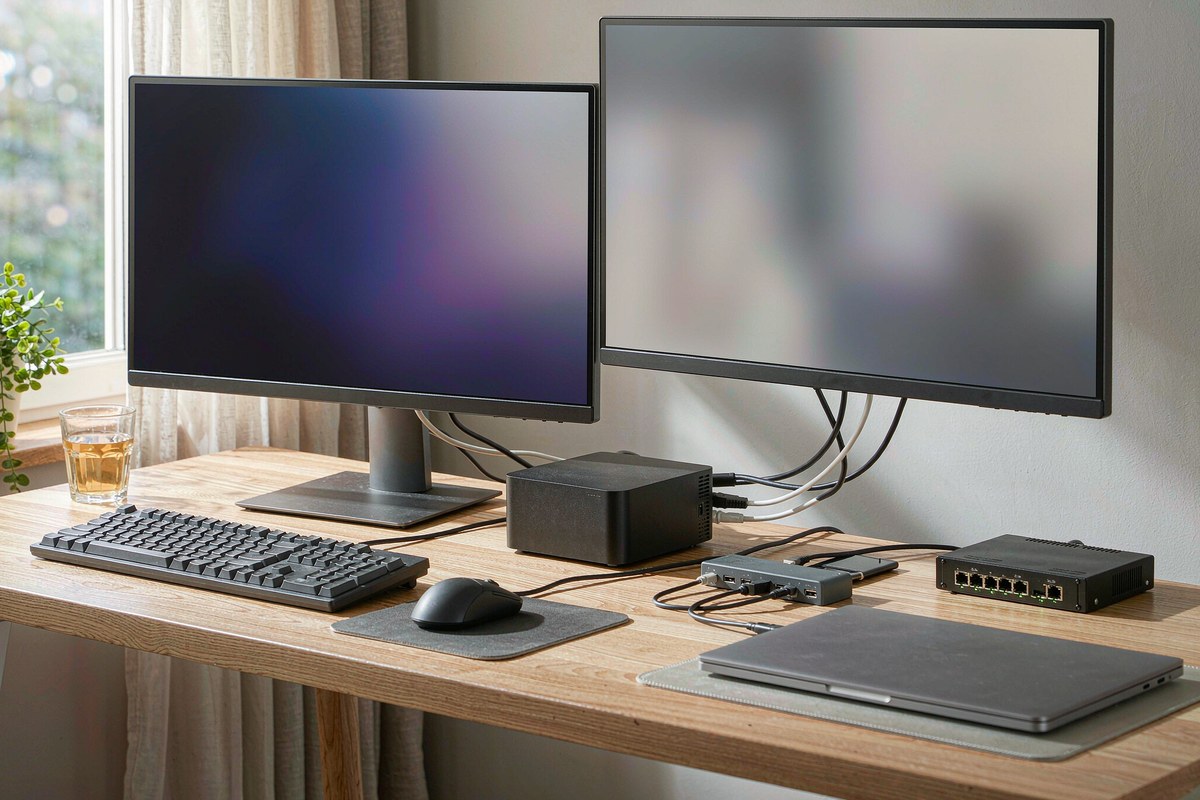
Our decision-first test for this class of PC starts with the desk. A mini PC should reduce clutter, not create a second set of compromises. The Glorlin has enough connectivity to sit behind a monitor or beside a router while retaining direct access to HDMI and DisplayPort. That matters for a two-screen office, a living-room media station, or a developer setup where one screen holds a browser and the other holds a terminal.
The Ryzen 7 8745HS is the reason this configuration feels more ambitious than an entry-level office box. Eight cores and 16 threads are meaningful when a dozen browser tabs, a video call, a spreadsheet, and a local development server are open together. We would still separate burst performance from sustained performance: a small enclosure can be quick for a few minutes and less impressive after long CPU-heavy runs. Keep ventilation clear, especially when the unit is installed in a shelf.
Gaming is a settings exercise. Radeon 780M graphics can handle many esports and older games at 1080p with sensible presets, but the buyer should not expect new, demanding releases to behave like they would on a discrete card. The 16GB memory configuration also serves as graphics memory, so background applications reduce the margin available to the game. Closing launchers and browser tabs is not busywork here; it is part of getting consistent results.
The storage and networking mix is more convincing for productivity than the word “Gaming” in the product name. A 1TB SSD is large enough to avoid immediate housekeeping, and dual 2.5GbE ports can support a fast wired workflow when the router, switch, and NAS also support those speeds. If the rest of the network is gigabit, the second port still has utility for a separate device link, but it will not magically increase internet speed.
- CPU: 8 cores, 16 threads, up to 4.9GHz.
- Memory: 16GB DDR5 in the listed configuration.
- Storage: 1TB SSD before operating-system and recovery overhead.
- Wired networking: 2 ports at up to 2.5Gbps each when the network supports it.
- Video: HDMI and DisplayPort, with 4K support stated in the listing.
We also care about upgrade friction. The listing advertises memory support up to 256GB, which gives the platform a better ceiling than a soldered-memory appliance. That figure should be treated as a support claim until the exact modules and access procedure are confirmed. For a buyer who plans to keep the PC for five years, the ability to add memory or replace storage may matter more than a small difference in launch-day performance.
There is one practical limit we would not gloss over: this is still an integrated-graphics system. It can be a compact gaming PC for the right games, but it is not the right purchase for high-refresh AAA gaming, professional GPU rendering, or local AI workloads that need substantial VRAM. In those cases, the cost of a graphics-capable desktop is easier to justify than trying to make a 780M do a discrete card’s job.
Who should buy it
Buy it if you want a compact Windows desktop for demanding office work, coding, media, light gaming, and fast wired networking. The combination of an 8-core CPU, 1TB SSD, 16GB DDR5, two 2.5GbE ports, and HDMI/DisplayPort is unusually broad for a small desk footprint.
Skip it if you need maximum frame rates, quiet sustained rendering, or the lowest possible cost for basic office tasks. Also skip it if you cannot confirm the upgrade configuration that matters to your plan; the headline 256GB memory support is not the same as shipping with 256GB.
FAQ
Can the Glorlin mini PC replace a gaming tower?
It can replace a tower for esports, older games, and lighter 1080p gaming when settings are realistic. It should not be treated as a discrete-GPU replacement for demanding new releases or high-refresh gaming.
Is 16GB of RAM enough for this mini PC?
Sixteen gigabytes is adequate for office work, coding, streaming, and moderate multitasking. Because the Radeon 780M uses shared memory, heavier games and creative workloads benefit from more memory if the internal upgrade path supports it.
What are the two 2.5GbE ports useful for?
They can connect the PC to a fast switch and a second wired device, or support a home-lab and NAS workflow. Actual transfer speed depends on the connected hardware, cabling, storage, and network configuration.
Does it support two 4K displays?
The listing specifies 4K HDMI and DisplayPort, so the connection set is suitable for a dual-display desk. Confirm the exact refresh-rate limits for the displays you plan to use, because 4K resolution alone does not specify refresh performance.
Where to buy
For more tested buying context, browse the Freakin Review electronics review hub before choosing between mini PCs, monitors, and desk hardware.
Update log
October 22, 2026 — Initial review published with the listed price, rating, specifications, and connectivity details.

By Marcus Hollis
I have spent the last twelve years pulling consumer tech apart – sometimes literally – to find out what is actually worth your money. Before starting Freakin Review, I ran product QA and return-rate analysis for a Dallas-based electronics retailer, where thousands of returned devices a month taught me one lesson: spec sheets lie more often than reviewers do. I lead our testing bench in Austin, where every power bank, pair of earbuds, and computer peripheral goes through a standardized 10-point routine – real measurements, weeks of daily use, and no free sample we are afraid to criticize. When a product fails, I say so, even when the affiliate link pays less.