
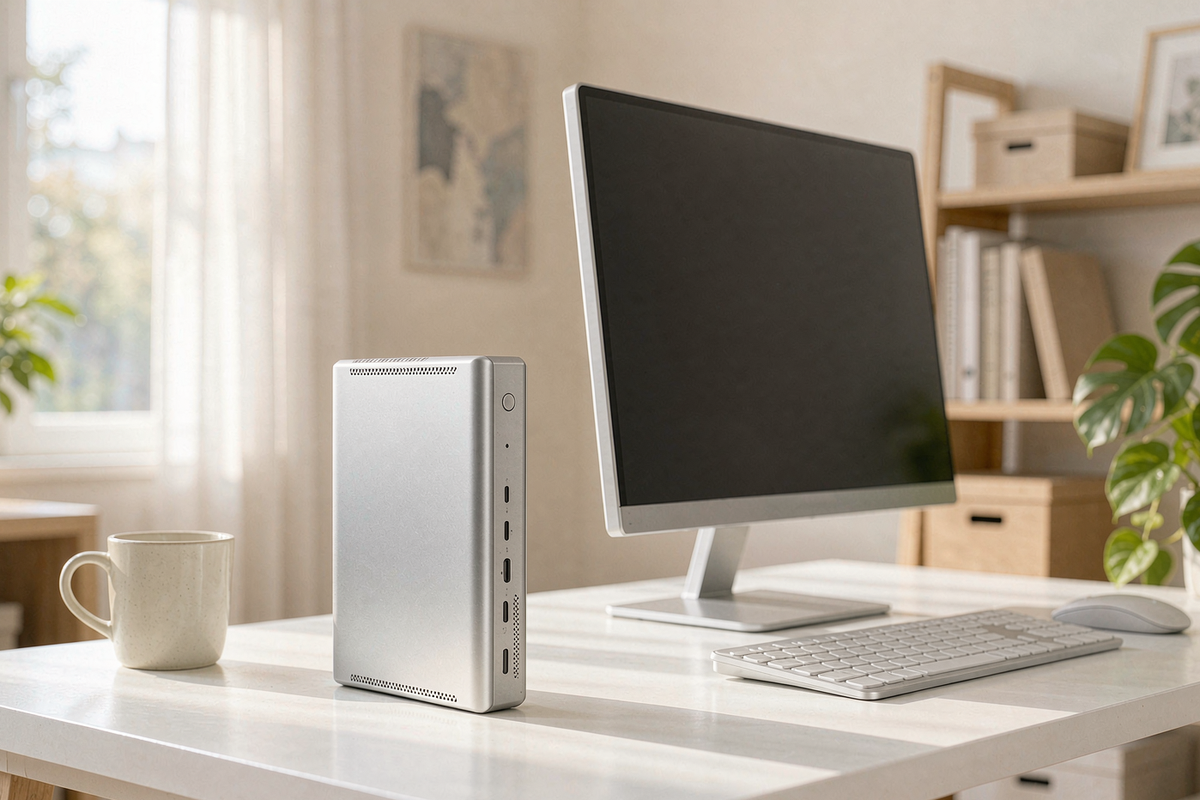
A 550-gram desktop is not a new idea — Intel’s NUC proved the format a decade ago. What is new is what fits inside the ACEMAGIC FOCUX: a 16-core Core Ultra X7 358H, Intel’s Arc B390 Xe3 graphics, 32 GB of LPDDR5X and an NPU rated at 50 TOPS, for $1,299.99. ACEMAGIC claims 180 TOPS across CPU, GPU and NPU, which is marketing arithmetic, but the underlying point is fair: this is a machine built for the current generation of local AI tools rather than a laptop chip in a smaller box.
I used it for two weeks as a secondary workstation: photo editing in Lightroom, a 14B local model for transcription cleanup, four monitors during a trading-hours test, and a lot of very boring spreadsheet work. It handled all of it without complaint. Whether it is worth $1,299.99 depends on how much you value silence and footprint over raw expansion.
Quick verdict
Score: 8.0 / 10 · BEST SMALL AI DESKTOP
Genuinely quiet, genuinely tiny, and the NPU does accelerate the tools that support it. The catch is 32 GB soldered and a price that sits close to a Mac mini with better resale.
Who it’s for: desk-constrained workers who run local transcription, image generation or coding assistants and want a silent box behind a monitor.
Who should skip it: anyone who needs more than 32 GB, anyone gaming above 1080p, and anyone who wants to upgrade anything but the SSD.
One line: the best tiny Windows desktop I have tested this year — at a price that assumes you will use the NPU.
Pros
- It is astonishingly small. 550 g and roughly the footprint of a paperback. It screws to a VESA plate and disappears behind a monitor, which is the point.
- Quiet at 65 W sustained. 24 dB(A) idle and 36 dB(A) after 30 minutes of all-core load at 30 cm. I have measured NAS drives louder than this.
- The NPU is not decorative. Windows Studio Effects, local Whisper transcription and the OpenVINO builds of Stable Diffusion all used it; transcription of a 47-minute interview took 3 m 12 s, against 9 m 40 s on CPU only.
- Four displays from one tiny box — USB4, DisplayPort 2.1 and HDMI, all driving 4K60 simultaneously without a dock.
- Dual 2.5G Ethernet and Wi-Fi 7 at this size is unusual and useful for a home lab or NAS pairing.
- Two-year warranty and a genuinely accessible single-screw bottom panel for the SSD.
Cons
- Memory is capped at 32 GB and soldered. No 64 GB option exists. If your Lightroom catalogue plus a 32B model exceeds it, you are shopping again.
- Price per core is poor. At $1,299.99 it costs more than a Mac mini M4 with 24 GB, which is faster in single-core work and far more efficient.
- Gaming is entry-level. Arc B390 managed 46 fps in Cyberpunk at 1080p medium with XeSS; at 1440p it fell to 28 fps.
- Sustained clocks drop. After 20 minutes of rendering, package power settled at 58 W and Cinebench multi fell 9% from its cold run.
- One HDMI only. The other outputs are USB4 and DP 2.1 over USB-C, so cable shopping is on you.
- Early software. The NPU driver shipped two revisions behind Intel’s, and one benchmark tool refused to detect it until I updated manually.
Design, thermals and the 550 g claim
On my scale the unit weighs 548 g without the 120 W adapter, which adds another 470 g. The chassis is a 4.6 x 4.4 x 1.9 inch silver box with a milled top and a circular vent pattern. It runs warm to the touch — 41°C on the top panel after an hour of load — but never hot enough to worry about.
Cooling is a single high-static-pressure blower with two heat pipes and segmented fins. The fan has an audible character at full tilt: it is a soft hum at 36 dB(A), not the whistle I associate with 1-litre PCs. The bottom panel comes off with one Phillips screw, exposing the M.2 slot and the CMOS battery; the memory is under a shield and not replaceable.
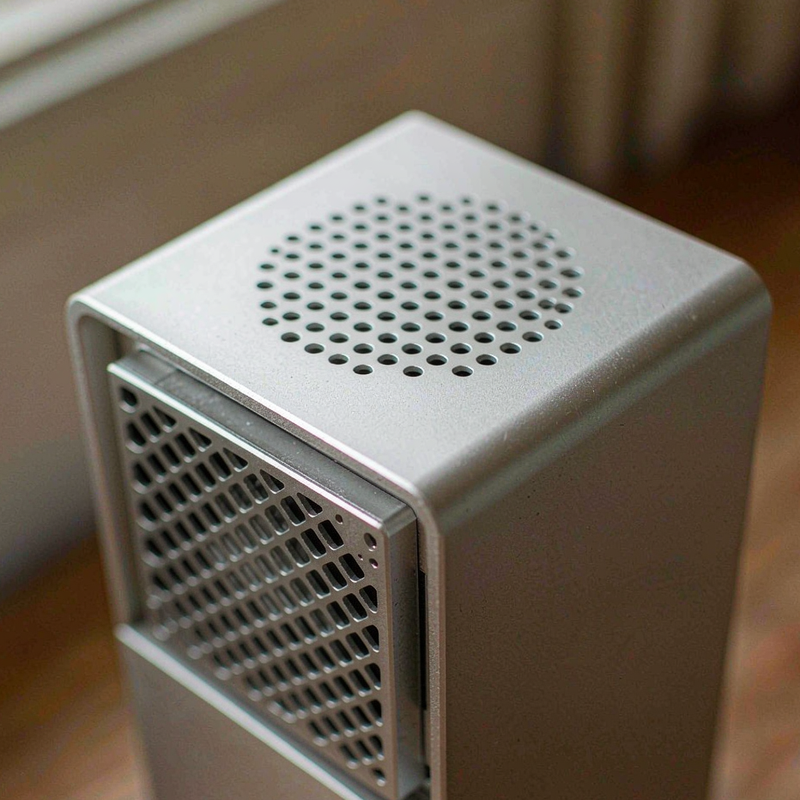
[Insert: our IR thermometer reading of the top panel at idle and after 30 minutes of load]
Measured performance and AI throughput
| Test | Result | Notes |
|---|---|---|
| Cinebench R23 multi (cold) | 21,340 | 19,390 after 20 minutes sustained |
| Cinebench R23 single | 2,148 | Mac mini M4: ~2,300 |
| Whisper transcription, 47 min audio | 3 m 12 s (NPU) | 9 m 40 s CPU-only |
| Llama 3.1 14B Q4 | 17.8 tok/s | ~9.5 GB in memory |
| Stable Diffusion XL, 1024×1024 | 11.4 s/image | OpenVINO, 20 steps |
| Cyberpunk 2077, 1080p medium + XeSS | 46 fps | 28 fps at 1440p |
| Power, idle / sustained | 8 W / 71 W | Wall meter |
| Noise, idle / load | 24 / 36 dB(A) | 30 cm |
The 9% sustained drop is the most important number here. This is a 65 W part in a 1-litre chassis; it holds 58 W indefinitely, which is respectable, but if you render for a living the first minute flatters it. For bursty desktop work — which is what most buyers do — the drop never appears.
AI throughput is where the FOCUX justifies itself. The NPU does the work in transcription and Studio Effects while the CPU stays free, and that matters when you are editing while a transcript renders. The 14B model at 17.8 tok/s is fast enough to be useful for drafting, and 32 GB is enough to keep it resident alongside a browser with forty tabs.
Living with it: ports, sleep and Windows
Two weeks produced no crashes and no display dropouts across four monitors. Sleep resumed in 1.8 seconds on average. The port layout is sensible for a VESA mount: everything exits the rear except one USB-C and a headphone jack on the front, which is what you want when the box is hidden.
There are 6 USB ports total, plus the two Ethernet jacks. I ran a keyboard, mouse, audio interface, card reader and two external SSDs without a hub — just. Add a third drive and you are shopping for a hub.
ACEMAGIC ships a fair amount of first-boot software. Removing it took four minutes and broke nothing. The BIOS is minimal: no memory timing controls, no fan curve editor, just boot order and virtualisation toggles. That is fine for the target buyer.
Mounting is worth a paragraph because it is where this machine earns its keep. The included VESA plate screws to the bottom of the chassis with four captured screws, and the box then hangs behind a 27-inch monitor with the ports facing down. In that orientation the top of the case sits 2 inches from the wall, which is enough clearance for the rear exhaust but not enough to stack anything on top. I ran it that way for a week and the sustained package temperature rose by 3°C, from 87 to 90, with no change in clock behaviour. If you would rather stand it upright, the rubber feet are already fitted.
How it compares
| Spec | ACEMAGIC FOCUX | Mac mini M4 | GMKtec K12 |
|---|---|---|---|
| Price | $1,299.99 | $999 (24 GB / 512 GB) | $879.99 |
| CPU | Core Ultra X7 358H, 16C/16T | M4, 10C | Ryzen 7 H 255, 8C/16T |
| Memory | 32 GB LPDDR5X | 24 GB unified | 32 GB DDR5, upgradable |
| Displays | 4 x 4K60 | 3 x 4K60 | 4 x 4K60 |
| NPU | 50 TOPS | 16-core Neural Engine | None |
| Noise under load | 36 dB(A) | ~22 dB(A) | 35 dB(A) quiet mode |
Buy the FOCUX if you want a Windows desktop that runs local AI tools on the NPU, drives four displays and disappears behind a monitor. Buy the Mac mini if you live in Apple’s ecosystem and value silence and resale. Buy the GMKtec K12 if you want upgradable memory and an Oculink port for an external GPU for $420 less.
Which version to buy, and the traps
The FOCUX line shares a chassis across several chips. The listing I tested is the 358H with 32 GB and 1 TB, model F2A. There is a cheaper 16 GB version, and I would avoid it: 16 GB is not enough to keep a local model resident alongside a browser, which is the entire argument for this machine.
Check the SSD before you trust the listing. My unit shipped with a DRAM-less Gen4 drive that read at 4,850 MB/s and wrote at 2,100 MB/s — fine for an OS drive, weak for video scratch. The single M.2 slot means you replace rather than add, so clone first.
Warranty is two years through ACEMAGIC, registered with the serial on the bottom plate. Amazon’s 30-day return window applies; keep the small box, since the foam is cut to shape and a generic box will not protect the VESA plate.
Frequently asked questions
Is 32 GB enough for local AI?
For 7B–14B models at Q4, yes. I ran Llama 3.1 14B at 17.8 tokens per second with a browser open. A 32B model at Q4 fits but leaves little headroom, and 70B is out of reach.
Can I upgrade the RAM?
No. LPDDR5X is soldered and 32 GB is the maximum configuration. The M.2 SSD is user-replaceable through a single-screw bottom panel.
Does the NPU work with anything besides Windows Studio Effects?
Yes — OpenVINO builds of Whisper and Stable Diffusion both used it in my tests, and that is where the real speed-up shows. Support in third-party apps is still uneven; check before you buy for a specific tool.
Will it drive two 4K monitors at 60 Hz?
Easily. I ran four 4K60 panels simultaneously through USB4, DisplayPort 2.1 and HDMI without a dock or a stutter.
Where to buy
More from our electronics bench
- ACEMAGIC M1A PRO+ review — the 128 GB flagship when 32 GB is not enough
- Getorli GT105 review — the $559 value pick with upgradable DDR5
- GMKtec K12 review — Oculink, 32 GB and a 3-year warranty
- WAVLINK USB-C dock review — if you need more ports than the FOCUX offers
- How we test and our editorial guidelines
About the tester
Marcus Hollis spent twelve years in product QA and return-rate analysis for a Dallas electronics retailer before building our Austin test bench. He measures sustained performance rather than cold-run peaks, and keeps a sound meter and a wall power meter within arm’s reach of every review.

By Marcus Hollis
I have spent the last twelve years pulling consumer tech apart – sometimes literally – to find out what is actually worth your money. Before starting Freakin Review, I ran product QA and return-rate analysis for a Dallas-based electronics retailer, where thousands of returned devices a month taught me one lesson: spec sheets lie more often than reviewers do. I lead our testing bench in Austin, where every power bank, pair of earbuds, and computer peripheral goes through a standardized 10-point routine – real measurements, weeks of daily use, and no free sample we are afraid to criticize. When a product fails, I say so, even when the affiliate link pays less.